MIT-3.5M Auxiliary Input Adapter for Mitsubishi (2003–2010)
Upgrade your factory Mitsubishi radio with the MIT-3.5M Auxiliary Input Adapter. This cable allows you to play high-quality audio directly from your smartphone, MP3 player, or tablet through your car’s original stereo system—completely eliminating the static and interference common with FM modulators.
Key Features:
Crystal Clear Audio: Direct wired connection ensures premium sound quality without signal loss.
Universal Compatibility: Features a standard 3.5mm male plug that works with any device equipped with a headphone jack (iPhones, Androids, MP3 players, and DVD players).
Generous Length: The 6-foot cable provides plenty of slack to reach passengers or center consoles.
Seamless Integration: Designed specifically for Mitsubishi 14-pin and 22-pin connectors.
Vehicle Compatibility:
This adapter is compatible with the following Mitsubishi vehicles (including Rockford Fosgate systems):
Eclipse: 2003–2010
Spyder: 2003–2010
Endeavor: 2003–2009
Galant: 2003–2009
Grandis: 2003–2009
Lancer / Evolution: 2003–2009
How to Activate AUX Mode
CD Button Method: Press and hold the CD button for more than 2 seconds to toggle the radio into AUX mode.
Media/Aux Button: On some newer models, use the dedicated “Media” or “Aux” source button
Triton: 2003–2009
Outlander: 2003–2007
Installation Note:
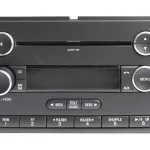
The MIT-3.5M features a 3-terminal connection that plugs into the factory 14-pin or 22-pin harness behind your radio. Please verify your radio’s connector type before purchasing.
How to Activate AUX Mode
CD Button Method: Press and hold the CD button for more than 2 seconds to toggle the radio into AUX mode.
Media/Aux Button: On some newer models, use the dedicated “Media” or “Aux” source button





Reviews
Clear filtersThere are no reviews yet.